Skype + OneDrive
Cloud file sharing in Skype — OneDrive links instead of attachments, designed and validated through user testing.
- Company
- Microsoft
- Role
- Product Designer
- Sector
- Communication · Cloud
- Platforms
- Mobile, Desktop
- Tools
- Sketch, Zeplin, InVision, UserTesting
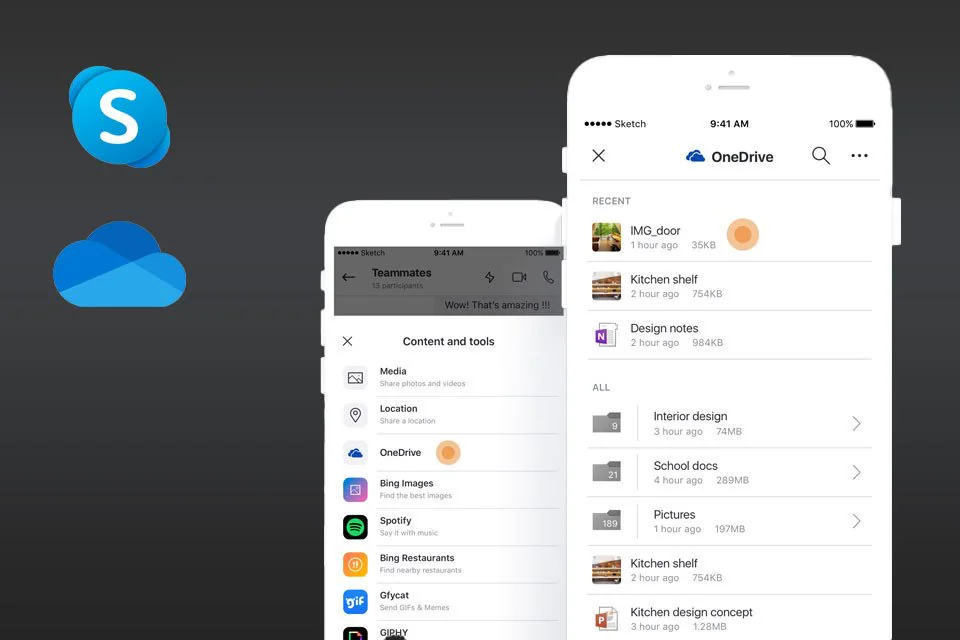
Overview
OneDrive is Microsoft's cloud storage and sharing experience. As Skype set out to be at its best with Microsoft's first-party services, OneDrive sat at the center of the collaboration story.
To make collaboration in Skype easier and more scalable, we moved toward sharing links from cloud storage — and away from attaching documents to chats.
The problem
Sharing a file or photo from OneDrive took a detour: create a link in OneDrive, copy it, then paste it into a Skype chat.
Goals
Sharing from OneDrive in Skype should be as quick and easy as in the OneDrive app or website.
- People can easily browse, preview and tell similar files apart before sharing
- Recipients can open shared files without signing in to OneDrive
- Non-goal: replacing the existing file picker
Share from the chat
OneDrive sits in the chat's Content and tools menu, next to Media and Location. Pick a file, check the preview, share the link — without leaving Skype.
Links, not attachments
A shared file or folder lands as a card — preview, name, OneDrive as the source, and View. The share sheet says who can open it: anyone with the link.
On desktop
In Skype for desktop, OneDrive opens as a panel beside the conversation — browse or search, then confirm with the same share sheet.
User testing
The task: “Share 2 files with your friend — Kitchen design concept and Kitchen shelf — from the Interior design folder in your OneDrive.” What we tested:
- The overall flow
- Opening a folder vs. selecting an item
- Selecting and deselecting single and multiple items
- Previewing multi-selected items
orkun@buran:~$ contact --now
Let's get in sync.
Bring the intent. I'll take it from prompt to production — with you in the loop.